Short answer: make your OG image 1200 × 630 pixels (a 1.91:1 aspect ratio), keep it under 5 MB, and serve it as PNG or JPEG over an absolute HTTPS URL. That one size renders correctly on Facebook, X, LinkedIn, Slack, Discord, WhatsApp, and iMessage.
That's the answer most people came for. The rest of this guide covers the per-platform details, the exact meta tags to paste in, the reasons a preview refuses to show up, and — if you publish more than a handful of pages — how to stop making these images by hand entirely.
What is an OG image?
The OG (Open Graph) image is the picture a platform shows when someone shares your link. It comes from a single meta tag in your page's <head>:
<meta property="og:image" content="https://yoursite.com/og/pricing.png" />
Open Graph started as a Facebook protocol, but today every major surface reads it: X, LinkedIn, Slack, Discord, WhatsApp, Telegram, iMessage, and most search and chat AI previews. Links with an OG image get dramatically more clicks than a bare grey card — it's the cheapest CTR win in marketing.
OG image size per platform
| Platform | Recommended size | Aspect ratio | Notes |
|---|---|---|---|
| 1200 × 630 | 1.91:1 | Min 200 × 200; under 8 MB | |
| X (Twitter) | 1200 × 628 | 1.91:1 | summary_large_image card; under 5 MB |
| 1200 × 627 | 1.91:1 | Min 1200 × 627 for full-width card | |
| Discord | 1200 × 630 | 1.91:1 | Also honors theme-color for the accent bar |
| Slack | 1200 × 630 | 1.91:1 | Falls back to any large image on the page |
| 1200 × 630 | 1.91:1 | Under 600 KB is safest for reliable previews | |
| 1000 × 1500 | 2:3 | The one holdout that prefers vertical |
Every row except Pinterest converges on the same shape. So unless Pinterest is a primary channel for you, one 1200 × 630 image covers everything.
Two practical rules inside that canvas:
- Keep text inside the middle ~87%. Some platforms crop edges by a few percent when they letterbox. A 60 px margin on all sides keeps headlines safe.
- Design for a thumbnail. Your image is often displayed 500 px wide on a phone. If the headline isn't readable at that size, it's decoration, not communication.
The meta tags you actually need
<!-- Open Graph (Facebook, LinkedIn, Slack, Discord, WhatsApp…) -->
<meta property="og:title" content="Your page title" />
<meta property="og:description" content="One-sentence summary." />
<meta property="og:image" content="https://yoursite.com/og/page.png" />
<meta property="og:image:width" content="1200" />
<meta property="og:image:height" content="630" />
<meta property="og:url" content="https://yoursite.com/page" />
<meta property="og:type" content="website" />

<!-- X / Twitter -->
<meta name="twitter:card" content="summary_large_image" />
<meta name="twitter:image" content="https://yoursite.com/og/page.png" />
og:image:width and og:image:height are optional but worth including: they let crawlers render the card on the first share instead of the second, before they've downloaded the image.
Why your OG image isn't showing
The five causes behind almost every "my link preview is broken" thread:
- Relative URL.
content="/og.png"fails on many crawlers. Always use the full absolutehttps://URL. - Stale cache. Platforms cache previews aggressively. After changing the image, re-scrape with the Facebook Sharing Debugger or LinkedIn Post Inspector — or change the filename, which busts every cache at once.
- Image too large. Over ~5 MB and X quietly drops it; WhatsApp gives up far earlier. 1200 × 630 as a compressed PNG or JPEG should land well under 1 MB.
- Blocked from crawlers. If the image sits behind auth, a bot-blocking CDN rule, or
robots.txtdisallow, the crawler sees a 403 and shows nothing. - Client-side rendering. Most crawlers don't execute JavaScript. Meta tags injected after load by a SPA are invisible — they must be in the server-rendered HTML.
The real problem: making one per page
One OG image is a design task. The trouble starts when you need one for every blog post, every product, every changelog entry, every user profile — each with its own title, in your brand, at the right size. Nobody opens Figma 400 times, so most sites quietly fall back to one generic fallback image on every page and lose the CTR that page-specific images earn.
The fix is to treat the OG image as a template plus data: design the layout once, then render it with each page's title and metadata.
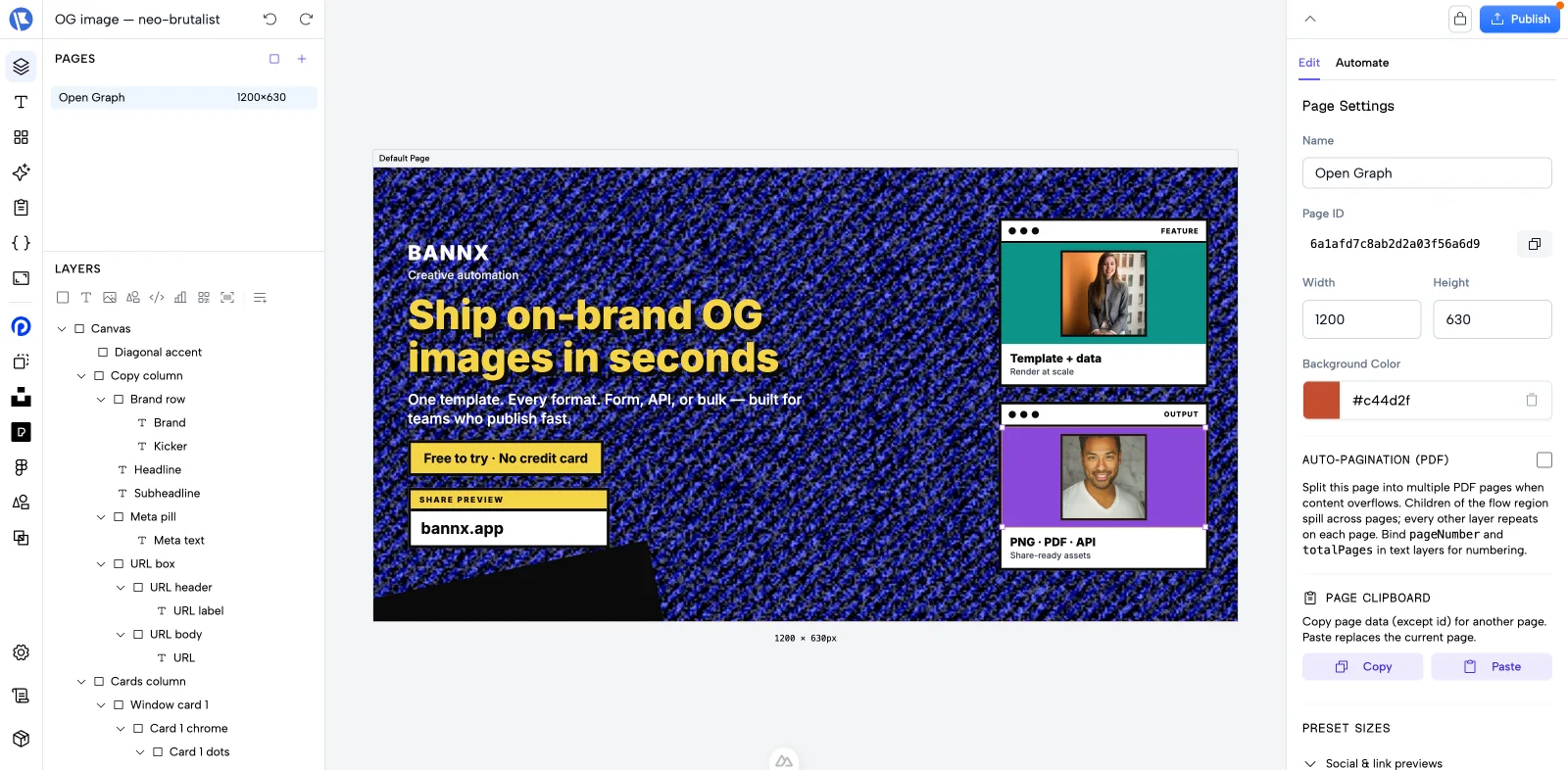
Here's what that looks like in bannx. This is an OG template in the editor — a 1200 × 630 canvas with a headline, brand kicker, feature cards, and pinned URL chip. Everything on the canvas is a layer you can restyle:
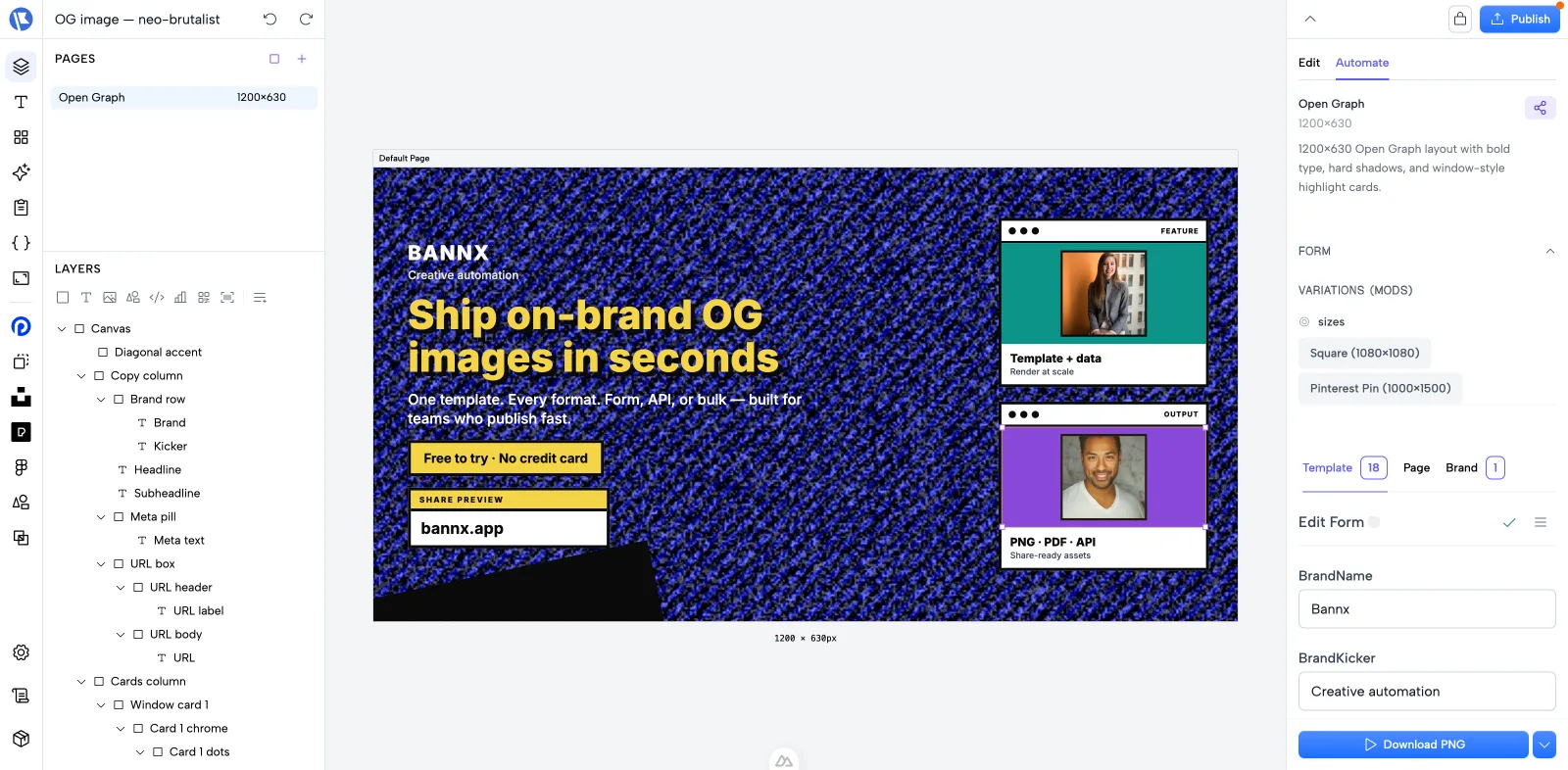
The parts that change per page — headline, brand name, images — are exposed as form fields on the Automate tab. Anyone can fill the form and download a PNG without touching the design, and the same form is available as sizes and variations (square, Pinterest vertical) from one template:
Generating them from code
The same template is an HTTP endpoint. Pass the page's data, get a PNG back:
curl -X POST https://bannx.app/api/render \
  -H "Authorization: Bearer $BANNX_API_KEY" \
  -H "Content-Type: application/json" \
  -d '{
    "pageId": "YOUR_TEMPLATE_PAGE_ID",
    "format": "png",
    "data": { "headline": "OG image size: the complete guide" }
  }'
Point your og:image tag at a URL like that (or pre-render at build time), and every page ships with its own on-brand preview — no design queue, no stale screenshots when the title changes.
FAQ
What is the best OG image size? 1200 × 630 pixels. It's the shared sweet spot across Facebook, X, LinkedIn, Slack, and Discord.
Can I use the same image for og:image and twitter:image?
Yes. Set twitter:card to summary_large_image and both tags can point at the same 1200 × 630 file.
PNG or JPEG for OG images? Either works everywhere. PNG for flat graphics and text (sharper), JPEG for photographic backgrounds (smaller). Avoid SVG — most crawlers won't render it. WebP support is improving but still not universal, so PNG/JPEG remains the safe default.
Why does my old OG image still show after I changed it? Cache. Re-scrape the URL in the platform's debugger tool, or rename the image file to force a fresh fetch.
Do OG images matter for SEO? Not for rankings directly — but they materially raise click-through when your pages are shared, and social distribution feeds every other channel.